Calypso Procreate Color Palette: A Creator’s Tool for Streamlined Digital Art
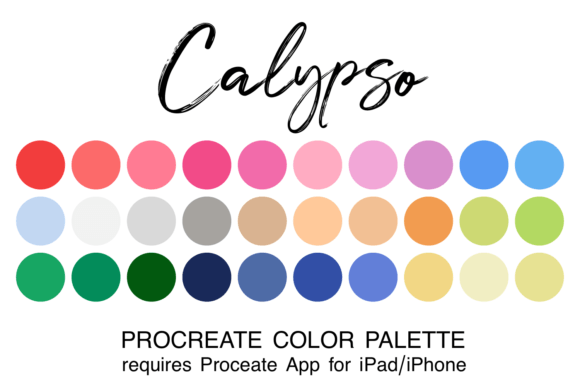
When you're deep in the flow of creating digital art, the last thing you want is to break your rhythm trying to mix the perfect shade of teal or hunting for a warm neutral. That’s where the Calypso Procreate Color Palette comes in. Designed specifically for the Procreate app, this curated set of 30 harmonious colors comes in a .swatch file format that integrates seamlessly into your digital workspace. Whether you're illustrating, designing, or just doodling for fun, having a ready-to-use palette like Calypso can save time and elevate your creative output.
How the Calypso Palette Works
The Calypso palette is more than just a random selection of colors—it’s a thoughtfully coordinated set that works well together across a range of creative styles. Once downloaded and installed into your Procreate app, the palette becomes instantly accessible. You simply tap the color icon in the top right corner of your screen, then select the palette from your list. From there, you can use it as is or customize it further to suit your project’s needs.
Installation is straightforward: download the zipped file, extract it in your iPad’s Files app, and tap the .swatch file. Procreate will automatically import it. This process is especially helpful for creators who work on the go and want to maintain a consistent color scheme across multiple projects.
Why Use a Curated Color Palette Like Calypso?
Color choices can make or break a design. When you're working on a deadline or trying to maintain a specific mood or theme, having a pre-selected palette removes the guesswork. The Calypso palette, with its balanced mix of warm and cool tones, offers versatility for a wide range of creative applications.
- Streamlines the creative process
- Ensures visual consistency across illustrations
- Helps maintain a cohesive look in digital branding or personal projects
Instead of spending time adjusting hues or picking colors that may not work well together, you can focus on the actual art. This is especially helpful for beginners who may not yet have a strong sense of color theory, but also appreciated by experienced artists who want to speed up their workflow.
1. Digital Illustration and Character Design
For illustrators working on character designs, children’s books, or concept art, a cohesive palette like Calypso can help maintain a consistent visual tone throughout the project. Imagine designing a series of characters for a storybook—having a ready-made palette ensures all your characters and backgrounds feel like they belong in the same world.
2. Branding and Social Media Content
Entrepreneurs and marketers who create their own visual content for Instagram, Pinterest, or TikTok can benefit from using the Calypso palette to maintain a professional and recognizable color scheme. Whether you're designing quote graphics, product mockups, or promotional illustrations, a unified palette keeps your brand identity consistent across platforms.
3. Digital Journaling and Personal Art
Many people use Procreate for digital bullet journals, mood boards, or personal art challenges like Inktober. The Calypso palette adds a polished touch to these creative outlets without requiring advanced color knowledge. It’s also a great way to explore new color combinations that you might not have thought to mix on your own.
4. Educational and Presentation Materials
Teachers, educators, and presenters who create visual aids or infographics in Procreate can use the Calypso palette to ensure clarity and visual appeal. With its balanced tones, it’s easy to highlight key points without overwhelming the viewer. This makes it a smart choice for classroom materials, tutorial videos, or online course content.
5. Commercial Art and Client Work
Freelance artists and designers often need to deliver work quickly while maintaining a high standard of visual quality. The Calypso palette can be a go-to option for client projects where time is tight and consistency is key. It’s also a great foundation for building custom palettes tailored to a specific brand or brief.
Who Benefits Most from the Calypso Palette?
While the Calypso palette is useful for anyone using Procreate, certain users will find it particularly valuable based on their workflow and goals.
- Beginners: Those new to Procreate or digital art in general can use the palette as a learning tool to understand color harmony and how different shades interact.
- Busy Creators: Freelancers, content creators, and small business owners who need to produce visuals quickly will appreciate the time saved by not having to build a palette from scratch.
- Brand Designers: Anyone building a visual brand identity can use Calypso as a base for creating a signature look that feels intentional and professional.
- Hobbyists: From digital scrapbooking to personal art journals, the palette brings a level of polish that makes casual projects feel more finished.
What to Consider Before Using the Calypso Palette
While the Calypso palette is a powerful tool, it’s not one-size-fits-all. Before downloading or using it, consider the following:
- Compatibility: Ensure you have the Procreate app installed on your iPad or iPhone. The .swatch file format is exclusive to Procreate, so it won’t work with other apps without conversion.
- Style Fit: Review the color range to make sure it aligns with your artistic style or the tone of your project. If you're working on something vibrant and bold, the muted tones in Calypso might not be the best fit.
- Customization: Don’t be afraid to tweak the palette once it’s imported. You can add, remove, or adjust colors to better suit your needs.
Final Thoughts
The Calypso Procreate Color Palette isn’t just a convenience—it’s a tool that enhances creativity by removing friction. Whether you're a professional designer, a small business owner creating social media graphics, or someone who enjoys digital art as a hobby, having a curated set of colors at your fingertips can make a real difference in both your process and your final results.
By integrating the Calypso palette into your workflow, you’re not just saving time—you’re also creating space for more experimentation, more expression, and ultimately, more joy in your creative process. And isn’t that what art is all about?